
Sovereignty: The Illusion of Security without Automation
When people talk about building their own cloud, they usually focus on the cool stuff: spinning up containers, creating sleek dashboards, and showing off a fancy setup. I have to confess I’m no different. There is a strange satisfaction in watching a new service launch on your own hardware without asking permission from Microsoft, Google, or who else in the world.
But here is the dirty little secret nobody talks about: If you don’t automate maintenance and security, you don’t have a private cloud. You just have a ticking time bomb running in your meter cupboard.
Hyperscalers charge you big bucks not just for the CPU cores, but because they have armies of engineers patching Linux kernels, updating container images, and scanning for CVEs in the background while you sleep. The moment you step out of BigTech, you are that army.
And let’s be honest: manually updating dozens of Docker Compose files every weekend is the fastest route to burnout, or worse a completely unmaintained setup.
So, I set out to build a zero-overhead security and automation pipeline for my personal cloud.
The Philosophy: Defense in Depth (With Zero Overhead)
My goal was simple: my cloud needs to patch itself, monitor itself, and warn me when things get sketchy. This all has to be done while running on my trusty lightweight setup. To achieve this without turning server administration into a second full-time job, I broke the security architecture into four automated layers:
- Host Security:
Patching the underlying Debian OS without breaking running workloads. - Container Dependency Management:
Automatically detecting and bumping container image versions. - Vulnerability Scanning:
Proactively scanning every image for known CVEs. - Runtime Security:
Catching weird container behavior in real-time.
Here is how I wired it all together.
1. Host OS: Unattended Upgrades (Because I Have a Life)
Let’s start with the base layer: the Debian host (Calculon).
A common temptation when building a home cloud is to throw a naive apt-get update && apt-get upgrade -y into a daily cron job. Do not do this. Unless, of course, you enjoy waking up on a Tuesday morning to find out an unexpected kernel or Docker daemon upgrade killed your network interfaces and broke all your NFS mounts.
Instead, I configured unattended-upgrades to strictly target the Debian-Security origin.
sudo apt update
sudo apt install unattended-upgrades apt-listchanges mailutils -y
sudo dpkg-reconfigure -plow unattended-upgrades
Choose Yes In the configuration tool to enable the automatic upgrades. From this point edit manually the /etc/apt/apt.conf.d/20auto-upgrades file to enable security patches only.
// /etc/apt/apt.conf.d/50unattended-upgrades
Unattended-Upgrade::Origins-Pattern {
    "origin=Debian,codename=${distro_codename}-security,label=Debian-Security";
};

// Blacklist sensitive packages from unattended restarts
Unattended-Upgrade::Package-Blacklist {
    "docker.io";
    "docker-compose-plugin"
    "containerd";
};
Every morning at 06:00, Calculon quietly pulls critical security patches. If a kernel patch requires a reboot, it doesn’t just pull the plug. Instead it waits until 03:30 to perform a graceful reboot, giving my NFS mounts and systemd overrides time to settle.
2. Renovate Bot: Keeping Containers Fresh
With the host OS secured, the next challenge is container maintenance. Running outdated Docker images is a recipe for disaster, but checking Docker Hub every day is soul-crushing. This is where Renovate Bot comes in.
I run Renovate as a scheduled Gitea Actions workflow every night at 04:00 AM. It scans all my docker-compose.yml files in my GitOps repository, checks upstream registries, and opens Pull Requests automatically in my local Gitea instance.
// renovate.json excerpt
{
  "extends": ["config:recommended", ":semanticCommits"],
  "timezone": "Europe/Amsterdam",
  "dependencyDashboardApproval": false,
  "docker": {
    "pinDigests": true
  },
  "packageRules": [
    {
      "matchFileNames": ["stacks/observability/**"],
      "groupName": "observability stack"
    },
    {
      "matchUpdateTypes": ["major"],
      "minimumReleaseAge": "7 days"
    }
  ]
}
Notice a few key decisions here:
- Digest Pinning (
pinDigests: true): I don’t just pin image tags (e.g.:v3.14.0); Renovate pins the exact SHA256 digest. This guarantees that what I test is 100% immutable. - Stack Grouping: The Observability stack (Prometheus, Grafana, Loki, Promtail) is grouped into a single PR so partial updates don’t break my monitoring pipelines.
- Release Age: Major releases sit in “quarantine” for 7 days before Renovate proposes them. Let someone else test the zero-day bugs!
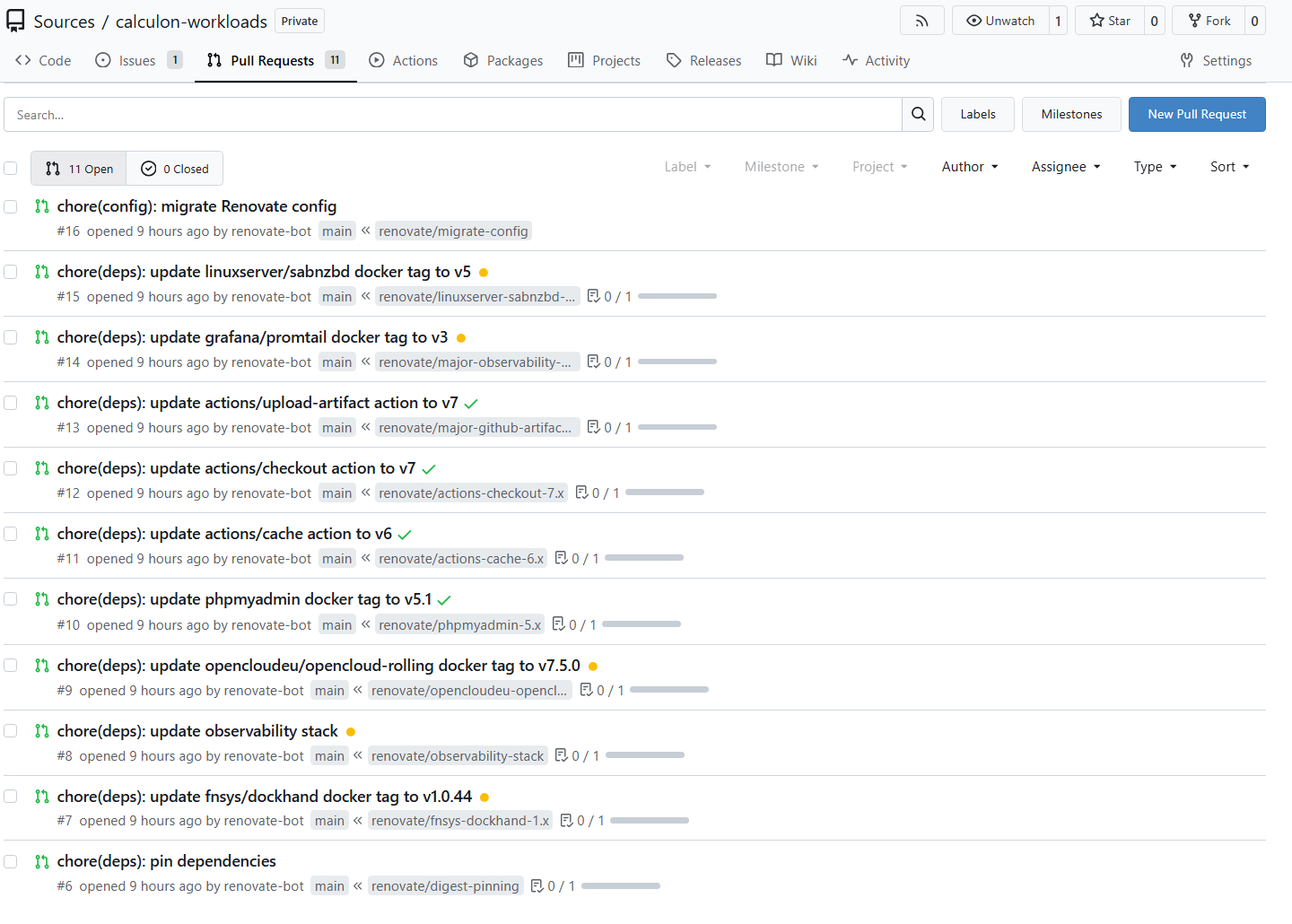
When it suits me, I open Gitea, review the Renovate PRs, and hit Merge.
Auto-Deployment via GitOps
Merging a PR in Gitea is where the magic happens.
My Gitea Actions deployment workflows pick up changes to main and deploy them directly to Calculon over SSH using rsync.
# Excerpt from deploy-observability.yml
- name: Copy files to server
  run: |
    rsync -avz --delete \
      --exclude 'storage/' \
      --exclude 'exporters/.env' \
      stacks/observability/ \
      someuser@calculon:/srv/docker/stacks/apps/observability/

- name: Restart stack
  run: |
    ssh someuser@calculon "cd /srv/docker/stacks/apps/observability && docker compose pull && docker compose up -d"
Notice the --exclude flags in rsync? That is the safety net that prevents that the workflow touches persistent storage or .env secret files, while the Compose files and configs are updated.
(Except for Gitea itself, of course. Having a CI/CD runner restart the very Gitea instance it is running on is a great way to create an infinite loop of sadness. For Gitea, the workflow copies the files and asks me to run docker compose up -d manually on the host).
3. Proactive Vulnerability Scanning (Anchore Grype)
Now, how do I know if an image I’m running actually contains vulnerabilities?
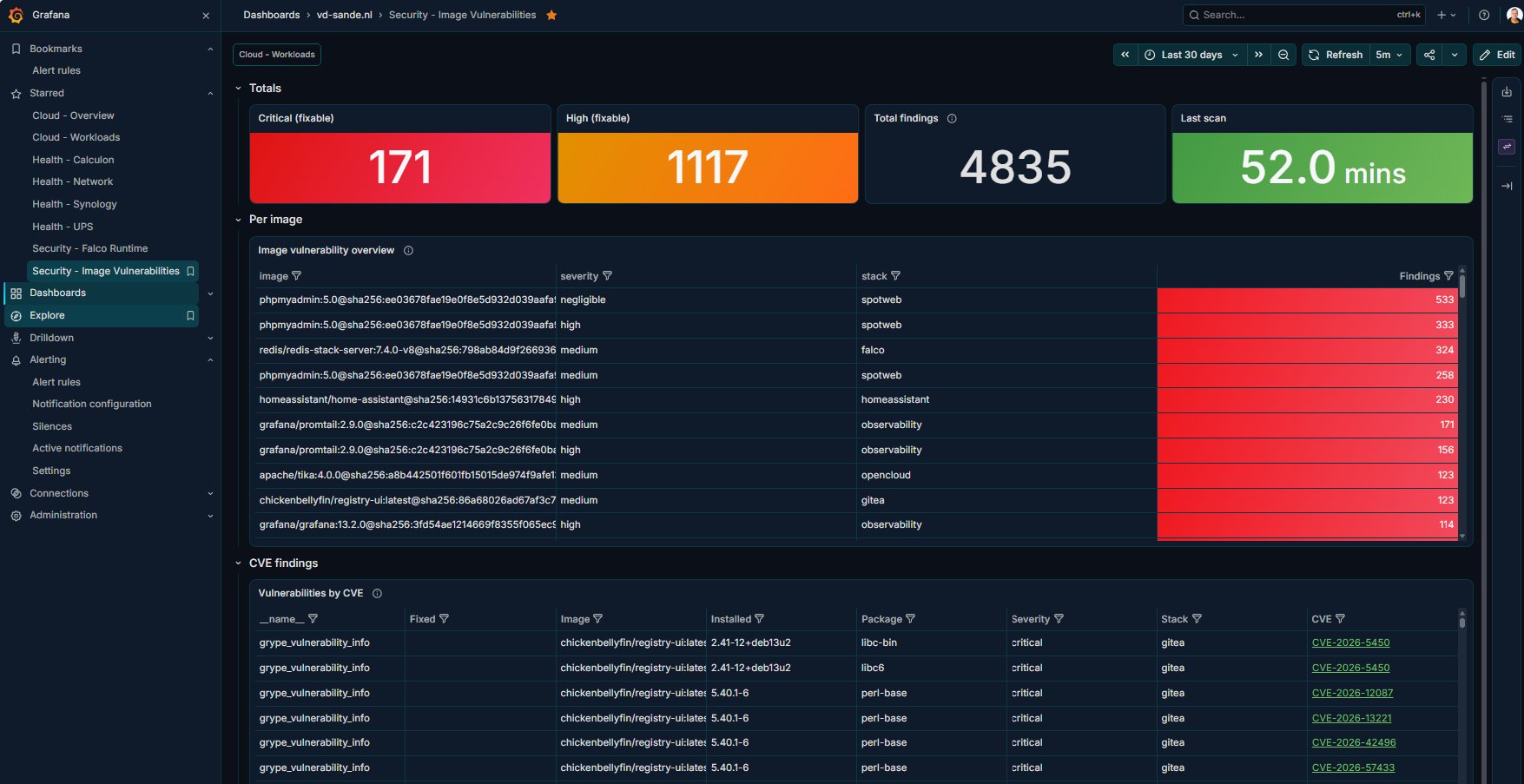
Every night at 02:00, a dedicated security workflow runs Anchore Grype against every single Docker image referenced across all my stacks.
across all stacks] --> grype[Grype Scan
02:00] grype --> metrics[metrics.prom] metrics --> pushgateway[Prometheus Pushgateway] pushgateway --> prometheus[Prometheus] prometheus --> grafana[Grafana Security Dashboard] grype --> findings{Fixable critical
vulnerabilities?} findings -->|Yes| alert[Prometheus Alert] alert --> grafana findings -->|No| report[Report findings]
If Grype finds fixable critical vulnerabilities, it doesn’t break the build (I prefer reporting over artificial gates), but it fires an alert into Prometheus and highlights the image in red on my Grafana Security Dashboard. If a fix exists, I know Renovate will have a PR ready for me shortly.
4. Meet Falco: The Guard Dog
At this point we have insight in known vulnerabilities with patches available (Renovate) and we know what packages contain vulnerabilites without a patch available. What if a container gets compromised at runtime, and starts showing suspicious behaviour?
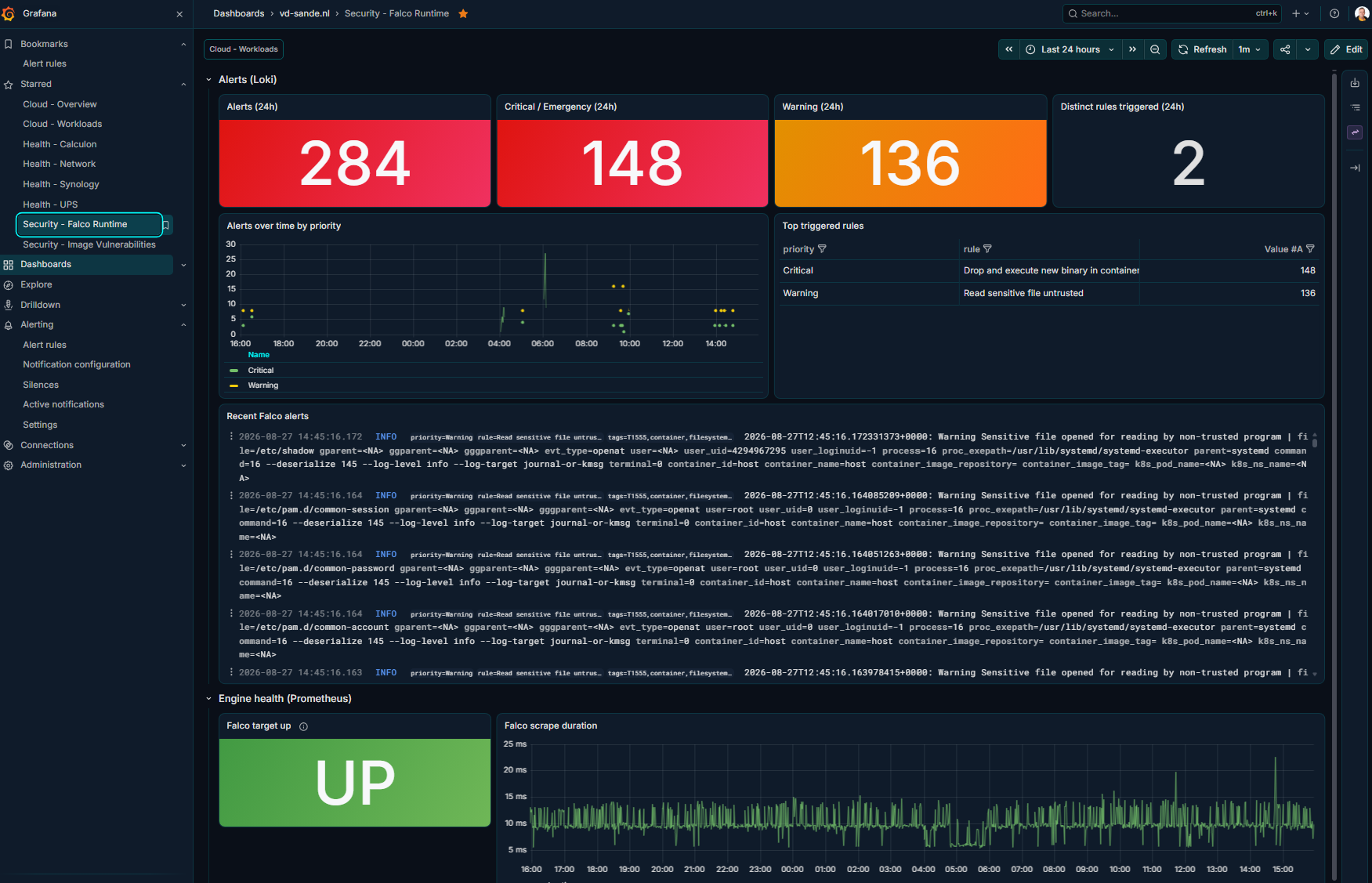
For runtime security, I run Falco with modern eBPF support. Falco hooks directly into the Linux kernel syscalls. If a container suddenly tries to spawn a shell, modify /etc/passwd, or establish an unexpected outbound connection, Falco detects it instantly.
Alerts are shipped via Falcosidekick straight into Loki, triggering instant notifications if anything fishy happens inside a container.
Wrap Up: A Real Cloud Has Automation
Running your own cloud takes some effort, but getting the maintenance automated makes all the difference. With a solid setup for OS patching, vulnerability scanning, and GitOps deployments, keeping everything secure doesn’t have to be a full-time job.
My routine now?
- Host security patches itself quietly at night.
- Grype scans for CVEs at 02:00 AM.
- Renovate prepares clean, digest-pinned PRs at 04:00 AM.
- I review the PRs over a coffee, click Merge, and let CI/CD do the heavy lifting.
No meltdowns, no ruined weekends. Just pure, sovereign automation.