

Sovereignty: Identity Confirmed!
As you may know, I’m working my way out of American BigTech. A journey that is more complex than it seems at a first glance. There are so many choices that you need to make, such as hosting, technology stacks, containerization, storage, backup and restore strategies, continuous delivery etcetera. All of this need to be in place before you even can think of deploying your workloads. At this moment I almost reached the phase in which I can start deploying my workloads.
There is just one crucial piece of the puzzle missing: Identity!
From Hyperscalers to “Do It Yourself” Identity
When you live in the world of hyperscalers, identity is something you never think about. Microsoft gives you Entra ID, Google gives you Google Identity, Apple gives you… well, something whatever Apple thinks you need.
Nevertheless, identity is simply there. Invisible. Effortless. Magically solving everything from login screens to access tokens. But the moment you step out of that world, you sooner or later realise that You don’t have identity anymore.
No login provider. No token issuer. No SSO. No federation. No “Sign in with Microsoft” button to hide behind. Just you, your servers, and a growing list of applications all asking the same question: “Who are you, and why should I let you in?”

A fair question, if you ask me!
Identity: the Missing Pillar of Sovereignty
When people talk about digital sovereignty, they usually focus on two things:
- Storage: keep your data where you control it.
- Compute: run your workloads on hardware you own.
But there’s a third pillar that’s just as important:
- Identity: the trust layer that decides who gets access to what.
Without identity, your private cloud is basically a collection of containers pretending to be a platform. With identity, it becomes an actual ecosystem. This is the non sexy part nobody tells you. You don’t just migrate your apps, you also need to migrate your trust model!
Exploring the Alternatives…
Before I ended up with my own identity setup, I looked at the three most popular self‑hosted options: Keycloak, Authelia, and Pocket ID. You can’t go wrong using one of these alternatives. These are real world solutions, widely used from homelabs, small‑to‑medium businesses to enterprises that want modern identity without handing everything to Microsoft or Google.
Each option has its own audience, personality, strengths, weaknesses and complexity.
Keycloak
The heavyweight champion. It’s enterprise‑grade, extremely capable, and used by many SMBs that need serious IAM features.
- Pros: powerful, flexible, supports every protocol you can imagine.
- Cons: heavy, complex, and feels like running your own mini‑Azure.
Authelia
A modern authentication gateway that protects your web apps through your reverse proxy. Popular in SMBs that mainly need secure access and MFA.
- Pros: lightweight, great for web access control, easy to integrate.
- Cons: not a full identity provider, limited for app‑to‑app authentication.
Pocket ID
A clean, minimal OpenID Connect provider built for simplicity. Perfect for homelabs and small teams that want modern identity without enterprise overhead.
- Pros: simple, fast, easy to deploy, no cloud dependency.
- Cons: fewer advanced features, not designed for large corporate IAM setups.
Why Pocket ID Fits My Requirements
In one of my earlier articles on sovereignty, I described the principles that guide my journey: keep things simple, understandable, and above all sovereign. No hidden dependencies, no magic cloud services, no “trust us, we handle identity for you.”
So when I started evaluating identity solutions, I looked at them through that exact lens. I don’t need enterprise IAM with tons of features I will never use. I don’t need a reverse‑proxy‑driven access gateway that only solves half the problem. And I definitely don’t need a system that requires a dedicated cluster and a certification course.
What I do need is, something lightweight, something modern, something self‑hosted and something that speaks OIDC.
Thus, I need something I can maintain without turning into an Identity engineer and that fits the scale of my environment. And that’s exactly why I ended up with Pocket ID.
My setup is too small to justify an enterprise grade identity solution that drowns me in configuration screens. I need something that gives me a modern identity with clean OIDC flows, without the overhead. This is where Pocket ID for me hits the sweet spot: it is powerful enough to be useful and simple enough to stay sane.
Let’s spin her up
Hosting Pocket ID, is just like running any other Docker container. For this I took the Docker-Compose that was already available.
services:
  pocket-id:
    image: ghcr.io/pocket-id/pocket-id:v2
    restart: unless-stopped
    env_file: .env
    ports:
      - 1411:1411
    volumes:
      - /mnt/synology/docker/pocket-id:/app/data
    user: "1027:100"
    healthcheck:
      test: [ "CMD", "/app/pocket-id", "healthcheck" ]
      interval: 1m30s
      timeout: 5s
      retries: 2
      start_period: 10s
In the folder of the docker-compose.yml file, I placed a .env file, containing the missing configuration needed to run Pocket ID
# See the documentation for more information: https://pocket-id.org/docs/configuration/environment-variables

# The APP_URL is the public accessible url to which the certificate is bound:
APP_URL=https://auth.vd-sande.nl

# Encryption key (choose a method):
# Method 1: Direct key (simple, less secure)
# Generate with: openssl rand -base64 32
ENCRYPTION_KEY=<BASE64 value>]

# Method 2: file based key (recommended)
# Put the base64 key in a file and point to the file.
# ENCRYPTION_KEY_FILE=/path/to/encryption_key

# optional, but recommended parameters:
TRUST_PROXY=false
MAXMIND_LICENSE_KEY=
PUID=1027
PGID=100
In order to persist that Pocket ID database, I mounted a folder on my Synology. As the service is critical to my eco system, I enabled a healthcheck that runs every 90 seconds. Allowing the service to be monitored.
At the DNS provider I added a new CNAME record to register the auth subdomain. On my Synology I added a Let’s Encrypt certificate that I added to the Reverse Proxy service: Allow HTTPS traffic to enter it, offload the SSL and forward the traffic to the listening port 1411 on my Lenovo server.
All that was left to do was to do the initial configuration inside Pocket ID, such as setting up users, passkeys, applications (OIDC clients) and assigning application access to users.
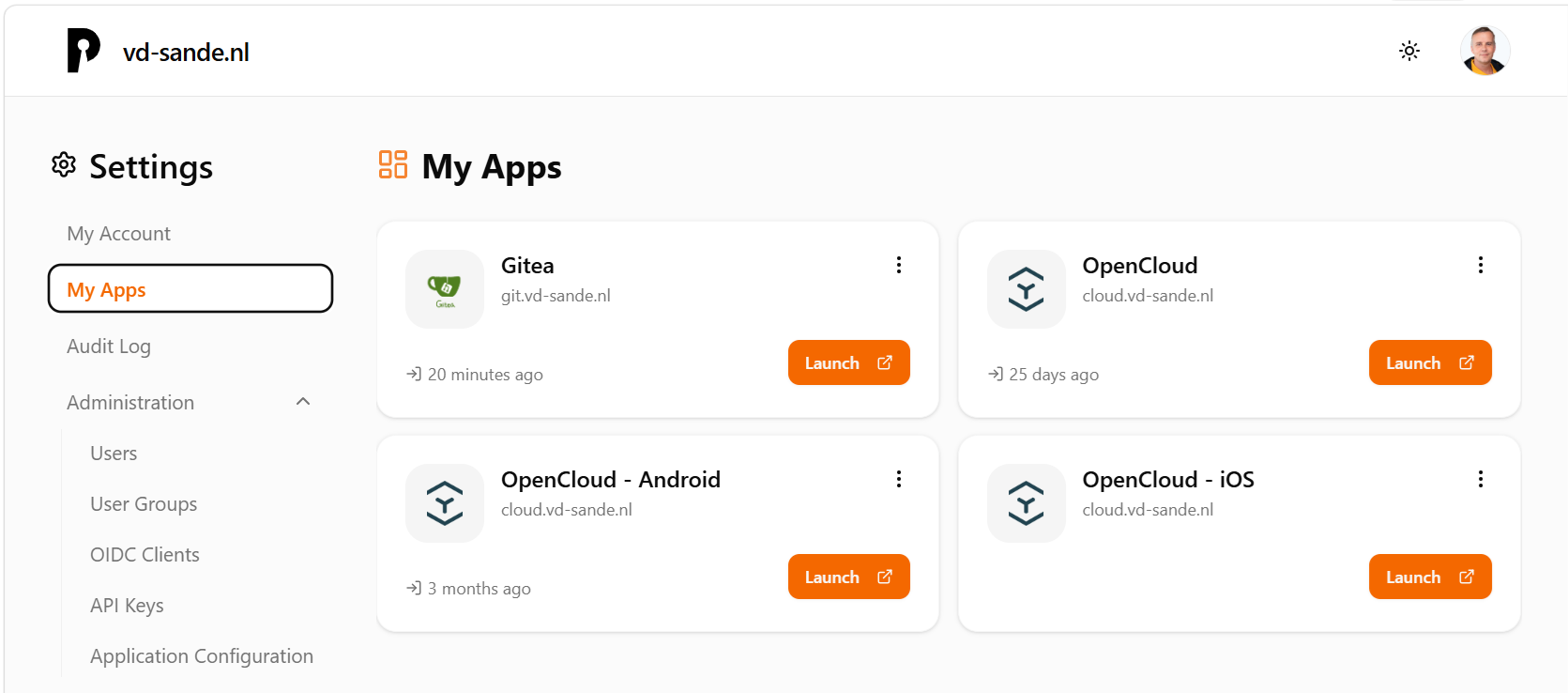
When Pocket ID is up and running you can delegate access control of your applications to Pocket ID. This is done by setting up a trust relation between the application and Pocket ID; where Pocket ID acts as the Identity Provider using Open Id Connect.
Once setup properly, when users want to access your applications, Pocket ID handles the login process. It sets the tokens and transfers the user back to the application. Just what you would expect from a modern SSO experience.

Wrap up
Without too much hassle, I managed to setup my own Identity Provider. Which Identity provider suits you, depend on your requirements and wishes. For me Pocket ID was the sweet spot: Powerful enough, however friendly to use.
Right now I have two of the three pillars in place, compute and identity. The next pillar will be cloud storage, that will allow me to eliminate my dependency on OneDrive.