

Bye Bye OneDrive
One of the features that drew me initially to the cloud was the idea of having your information at your fingertips. As long as I had an internet connection, I had access to my documents and media. No matter where I was, no matter the occasion, no matter the time of day. Just open a browser, and I could pick up exactly where I left off.
For me, that magic started around 2005 when I began working with SharePoint. At the time, it felt revolutionary. Fast‑forward a few years and OneDrive entered the scene: a cloud‑based file system built on top of SharePoint’s foundations.
The times were changing
Microsoft began stuffing more bloat into the Office licenses. Prices went up and useful features quietly disappeared. With the Cloud Act in mind, I started to realize that I didn’t have any control over my information and its accessibility. It became clear to me that I had to regain control.
I can almost hear you think: “Bas, don’t be such a drama queen!”
But hey… This is my personal information we’re talking about.
I wanted to decide where my files are stored and under which laws they fall.
Not a cloud vendor. Not some government. Just me.
The importance of the data doesn’t matter — what matters is ownership.
And that realisation pushed me toward digital sovereignty and ultimately toward OpenCloud.
Why OpenCloud?
My search for a OneDrive replacement started with Nextcloud. It’s the first platform people mention when you look into self‑hosted cloud storage, so I tried a demo. But it didn’t convince me. It felt like the system wanted to do too much (calendars, chat, mail, tasks), while I mainly needed a simple place to store and access my files.
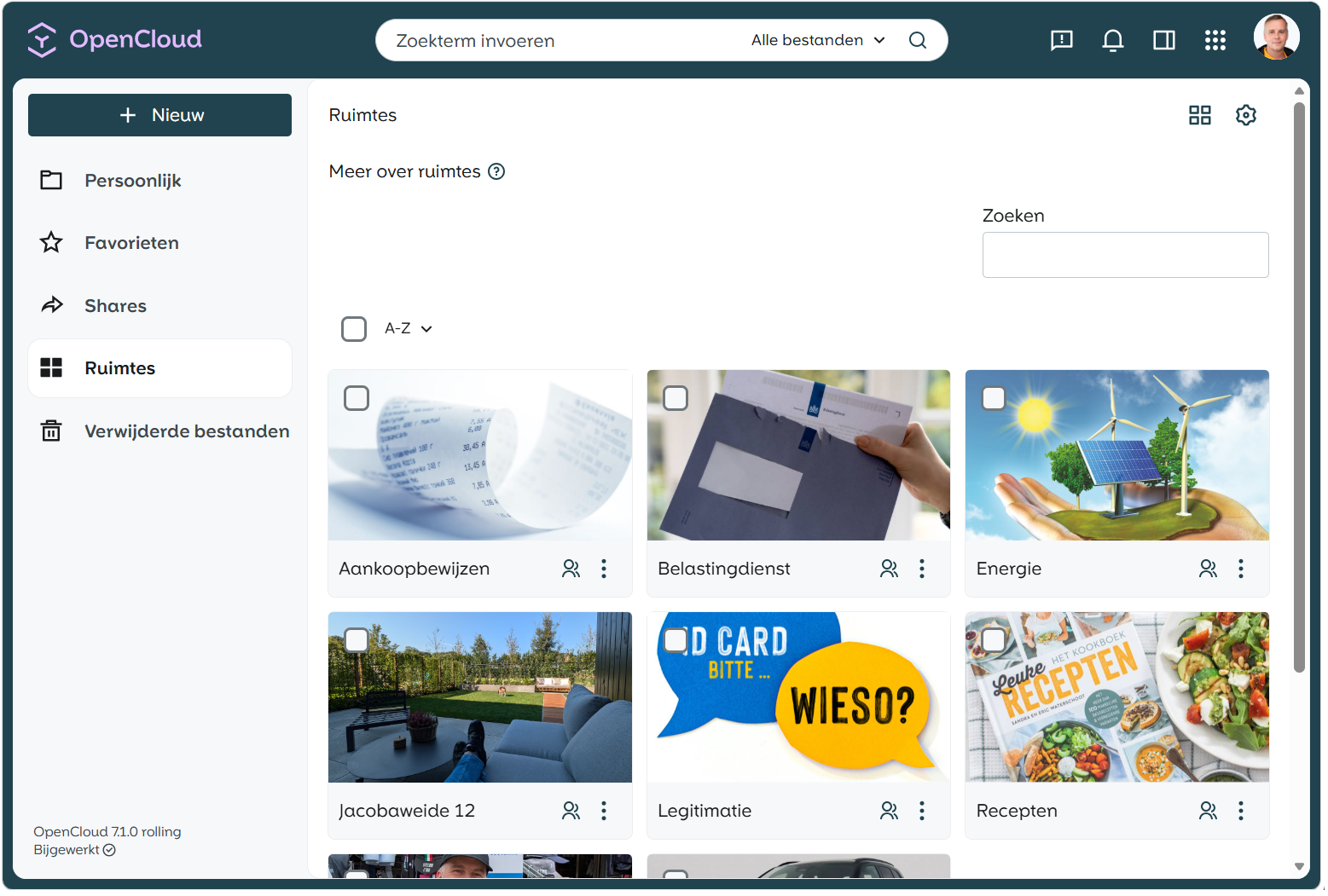
Then I discovered ownCloud and later OpenCloud. OpenCloud immediately stood out because it’s built in Go, a language known for speed and efficiency, and unlike the older PHP‑based ownCloud, it was rebuilt from scratch as a modern, lightweight platform.
OpenCloud doesn’t try to sync files like OneDrive. The files simply stay on the server, and clients access them through WebDAV or the API. This was exactly what I wanted, a clean and fast server‑side file platform without the heavy “all‑in‑one” approach.
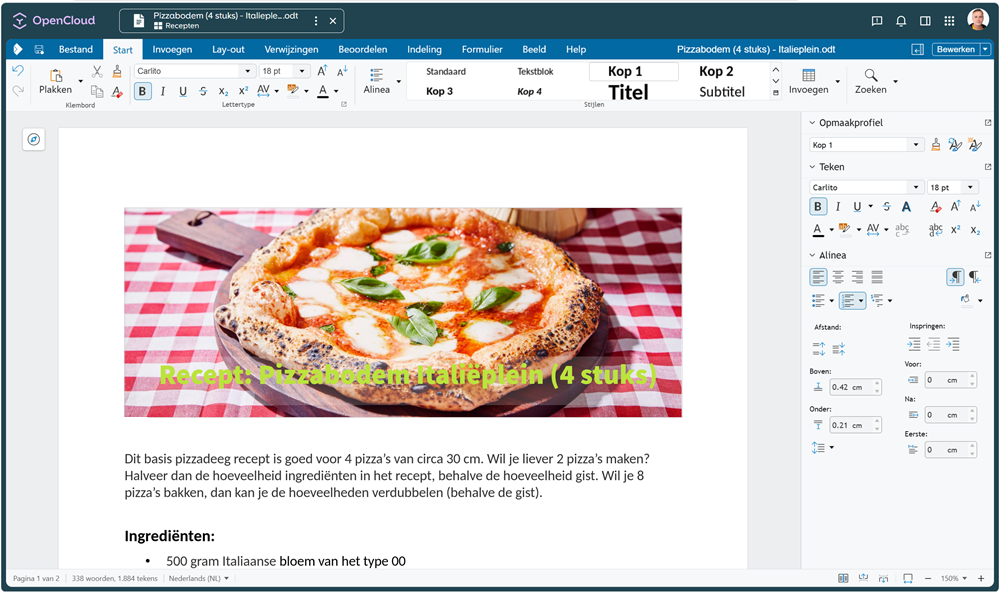
The simplicity combined with modern performance, made the choice easy. And as icing on the cake, I discovered that integrating Collabora was surprisingly straightforward, especially in combination with my own OIDC identity provider to facilitate secure access.
The big picture
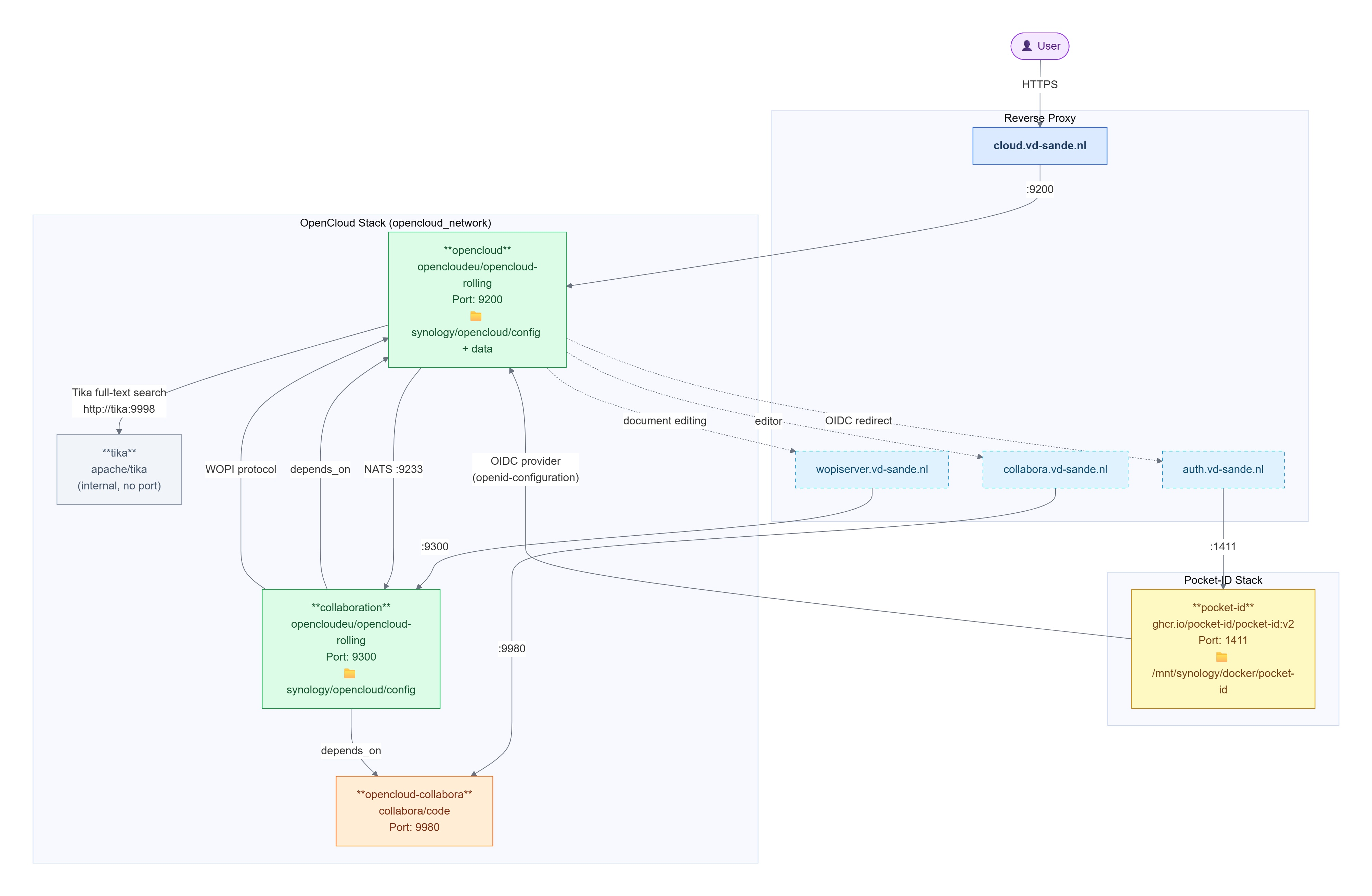
Self-hosting my own cloud storage involves more than just running a single container. Basically you are going to build a stack of containers that will give you the functionality you need. In the diagram below, I show the architecture I ended up with.
The Entry Point
Everything starts at cloud.vd-sande.nl. This is the only address my users ever type in their browser. Behind a reverse proxy, this hostname forwards traffic to the opencloud container on port 9200. Simple, clean, one door for the outside world.
The other hostnames — auth.vd-sande.nl, wopiserver.vd-sande.nl and collabora.vd-sande.nl — are what I call backend entries. They exist in DNS and in the reverse proxy, but no human being visits them directly. They are there for service-to-service communication.
Authentication With Pocket-ID
I chose Pocket-ID as my OIDC provider instead of the built-in identity management of OpenCloud. The reason is simple: I want one central place to manage users across all my self-hosted services.
Pocket-ID runs in its own stack, completely separate from OpenCloud. When a user tries to log in to OpenCloud, it performs an OIDC redirect to auth.vd-sande.nl, which points to Pocket-ID. After successful login, Pocket-ID sends the user back with a token. OpenCloud trusts this token because it fetches the openid-configuration metadata from Pocket-ID on startup.
Document Editing With Collabora
This is the part that involves most moving pieces. When a user opens a document, three services are involved:
- opencloud receives the request and decides a document must be opened
- It contacts collaboration (the WOPI server) via
wopiserver.vd-sande.nl - collaboration talks to opencloud-collabora (the actual Collabora Online editor) via
collabora.vd-sande.nl
The collaboration service depends on both opencloud and opencloud-collabora being healthy before it starts. This depends_on relationship is visible in the diagram and it is important — if Collabora is not ready, the WOPI server cannot function.
The internal communication between opencloud and collaboration happens over NATS on port 9233. This is the message bus that keeps these services synchronized.
Full-Text Search With Tika
The last piece is Apache Tika, which handles full-text extraction from documents like PDFs and Office files. OpenCloud calls Tika internally on http://tika:9998. Tika has no exposed port to the outside — it is purely internal to the Docker network.
Enough talk, give me the code
In order to compose this functionality, you need to create two files in a folder on your docker host (in my case the Lenovo Server).
.env
# General settings
COMPOSE_PROJECT_NAME=opencloud

# Admin password
ADMIN_PASSWORD=[admin password]

# Where data is stored for opencloud
FS_DIR=/mnt/synology/opencloud

# SMTP settings (optional - leave empty if not using)
SMTP_HOST=[smtp server fqdn]
SMTP_PORT=587
SMTP_SENDER=[sender email address]
SMTP_USERNAME=[sender username]
SMTP_PASSWORD=[sender password]
SMTP_AUTHENTICATION=

# Note: Ports are hardcoded in docker-compose.yml
# OPENCLOUD_PORT=9200
# COLLABORATION_PORT=9300
# WOPI_PORT=9980

# Domains (for reference - actual config is in docker-compose.yml)
# OC_DOMAIN=cloud.vd-sande.nl
# COLLABORA_DOMAIN=collabora.vd-sande.nl
# WOPISERVER_DOMAIN=wopiserver.vd-sande.nl
docker-compose.yml
#
# OPENCLOUD
#
services:
  opencloud:
    restart: always
    image: opencloudeu/opencloud-rolling:latest
    container_name: opencloud
    user: "1027:100"
    logging:
      driver: "json-file"
      options:
        max-file: "5"
        max-size: "50m"
    entrypoint:
      - /bin/sh
    command: ["-c", "opencloud init || true; opencloud server"]
    environment:
      OC_SKIP_CONFIG_GENERATION: "true"
      OC_ADD_RUN_SERVICES: ""
      OC_URL: "https://cloud.vd-sande.nl"
      OC_LOG_LEVEL: "info"
      OC_LOG_COLOR: "false"
      OC_LOG_PRETTY: "false"
      PROXY_TLS: "false"
      OC_INSECURE: "true"
      COLLABORA_DOMAIN: "collabora.vd-sande.nl"
      NATS_NATS_HOST: 0.0.0.0
      NATS_NATS_PORT: 9233
      GATEWAY_GRPC_ADDR: 0.0.0.0:9142
      IDM_CREATE_DEMO_USERS: "false"
      PROXY_HTTP_ADDR: 0.0.0.0:9200
      PROXY_ENABLE_BASIC_AUTH: "false"
      FRONTEND_ARCHIVER_MAX_SIZE: 1099511627776
      FRONTEND_ARCHIVER_MAX_NUM_FILES: 500000
      NOTIFICATIONS_SMTP_HOST: "${SMTP_HOST}"
      NOTIFICATIONS_SMTP_PORT: "${SMTP_PORT}"
      NOTIFICATIONS_SMTP_SENDER: "${SMTP_SENDER}"
      NOTIFICATIONS_SMTP_USERNAME: "${SMTP_USERNAME}"
      NOTIFICATIONS_SMTP_PASSWORD: "${SMTP_PASSWORD}"
      NOTIFICATIONS_SMTP_INSECURE: "false"
      NOTIFICATIONS_SMTP_AUTHENTICATION: "${SMTP_AUTHENTICATION}"
      NOTIFICATIONS_SMTP_ENCRYPTION: "none"
      PROXY_CSP_CONFIG_FILE_LOCATION: "/etc/opencloud/csp.yaml"
      OC_PASSWORD_POLICY_BANNED_PASSWORDS_LIST: banned-password-list.txt
      OC_SHARING_PUBLIC_SHARE_MUST_HAVE_PASSWORD: "true"
      OC_SHARING_PUBLIC_WRITEABLE_SHARE_MUST_HAVE_PASSWORD: "false"
      OC_PASSWORD_POLICY_DISABLED: "false"
      OC_PASSWORD_POLICY_MIN_CHARACTERS: "8"
      OC_PASSWORD_POLICY_MIN_LOWERCASE_CHARACTERS: "1"
      OC_PASSWORD_POLICY_MIN_UPPERCASE_CHARACTERS: "1"
      OC_PASSWORD_POLICY_MIN_DIGITS: "1"
      OC_PASSWORD_POLICY_MIN_SPECIAL_CHARACTERS: "1"
      OC_DEFAULT_LANGUAGE: nl
      IDM_ADMIN_PASSWORD: "${ADMIN_PASSWORD}"
      STORAGE_USERS_OCIS_DISABLE_VERSIONING: "true"
      STORAGE_USERS_DRIVER: "ocis"
      ### fulltext search
      SEARCH_EXTRACTOR_TYPE: tika
      SEARCH_EXTRACTOR_TIKA_TIKA_URL: http://tika:9998
      FRONTEND_FULL_TEXT_SEARCH_ENABLED: "true"
      FRONTEND_APP_HANDLER_SECURE_VIEW_APP_ADDR: eu.opencloud.api.collaboration
      GRAPH_AVAILABLE_ROLES: "b1e2218d-eef8-4d4c-b82d-0f1a1b48f3b5,a8d5fe5e-96e3-418d-825b-534dbdf22b99,fb6c3e19-e378-47e5-b277-9732f9de6e21,58c63c02-1d89-4572-916a-870abc5a1b7d,2d00ce52-1fc2-4dbc-8b95-a73b73395f5a,1c996275-f1c9-4e71-abdf-a42f6495e960,312c0871-5ef7-4b3a-85b6-0e4074c64049,aa97fe03-7980-45ac-9e50-b325749fd7e6"
      ###pocket-id OIDC###
      OC_OIDC_ISSUER: https://auth.vd-sande.nl
      WEB_OIDC_CLIENT_ID: 99ffaacc-5555-4444-1a27-1b01883efb72  #Fake ID :) --> Pocket ID autogenerated ID
      WEB_OIDC_METADATA_URL: https://auth.vd-sande.nl/.well-known/openid-configuration
      PROXY_OIDC_REWRITE_WELLKNOWN: true
      PROXY_USER_OIDC_CLAIM: preferred_username
      PROXY_USER_CS3_CLAIM: username
    volumes:
      - /mnt/synology/opencloud/config:/etc/opencloud
      - /mnt/synology/opencloud/data:/var/lib/opencloud
      - /srv/docker/stacks/apps/opencloud/config/apps:/var/lib/opencloud/web/assets/apps
    networks:
      - opencloud_network
    ports:
      - "9200:9200"


  collaboration:
    image: opencloudeu/opencloud-rolling:latest
    container_name: opencloud-collaboration
    user: "1027:100"
    depends_on:
      - opencloud
      - opencloud-collabora
    entrypoint:
      - /bin/sh
    command: ["-c", "opencloud collaboration server"]
    environment:
      COLLABORATION_GRPC_ADDR: 0.0.0.0:9301
      COLLABORATION_HTTP_ADDR: 0.0.0.0:9300
      COLLABORATION_WOPI_SRC: "https://wopiserver.vd-sande.nl"
      COLLABORATION_APP_NAME: "CollaboraOnline"
      COLLABORATION_APP_PRODUCT: "Collabora"
      COLLABORATION_APP_ADDR: "https://collabora.vd-sande.nl"
      COLLABORATION_APP_ICON: "https://collabora.vd-sande.nl/favicon.ico"
      COLLABORATION_APP_INSECURE: "true"
      COLLABORATION_CS3API_DATAGATEWAY_INSECURE: "true"
      COLLABORATION_LOG_LEVEL: "info"
      OC_URL: "https://cloud.vd-sande.nl"
      MICRO_REGISTRY: "nats-js-kv"
      MICRO_REGISTRY_ADDRESS: "opencloud:9233"
    volumes:
      - /mnt/synology/opencloud/config:/etc/opencloud
    networks:
      - opencloud_network
    ports:
      - "9300:9300"
    restart: always


  opencloud-collabora:
    image: collabora/code:latest
    container_name: opencloud-collabora
    cap_add:
      - MKNOD
    environment:
      extra_params: --o:ssl.enable=false --o:ssl.termination=true --o:welcome.enable=false --o:storage.wopi.alias_groups.mode=groups --o:net.frame_ancestors=cloud.vd-sande.nl
    restart: always
    entrypoint: ['/bin/bash', '-c']
    command:
      - |
        coolconfig generate-proof-key
        # Wait for config to be generated
        while [ ! -f /etc/coolwsd/coolwsd.xml ]; do sleep 1; done
        # Patch the WOPI alias_groups
        sed -i '/<alias_groups/,/<\/alias_groups>/c\
            <alias_groups desc="Multiple WOPI hosts" mode="groups">\
                <group><host desc="cloud" allow="true">https://cloud\\.vd-sande\\.nl</host></group>\
                <group><host desc="wopi" allow="true">https://wopiserver\\.vd-sande\\.nl</host></group>\
                <group><host desc="collabora" allow="true">https://collabora\\.vd-sande\\.nl</host></group>\
            </alias_groups>' /etc/coolwsd/coolwsd.xml
        # Start Collabora
        /start-collabora-online.sh
    healthcheck:
      test: ["CMD", "curl", "-f", "http://localhost:9980/hosting/discovery"]
      interval: 15s
      timeout: 10s
      retries: 5
    networks:
      - opencloud_network
    ports:
      - "9980:9980"


  tika:
    image: ${TIKA_IMAGE:-apache/tika:latest}
    # Using the base variant for smaller image size and faster startup
    # The base variant includes core functionality for text extraction
    # Full variant is only needed for specialized OCR/image processing
    # release notes: https://tika.apache.org
    user: "1027:100"
    networks:
      - opencloud_network
    logging:
      driver: ${LOG_DRIVER:-local}
    restart: always


networks:
  opencloud_network:
    driver: bridge
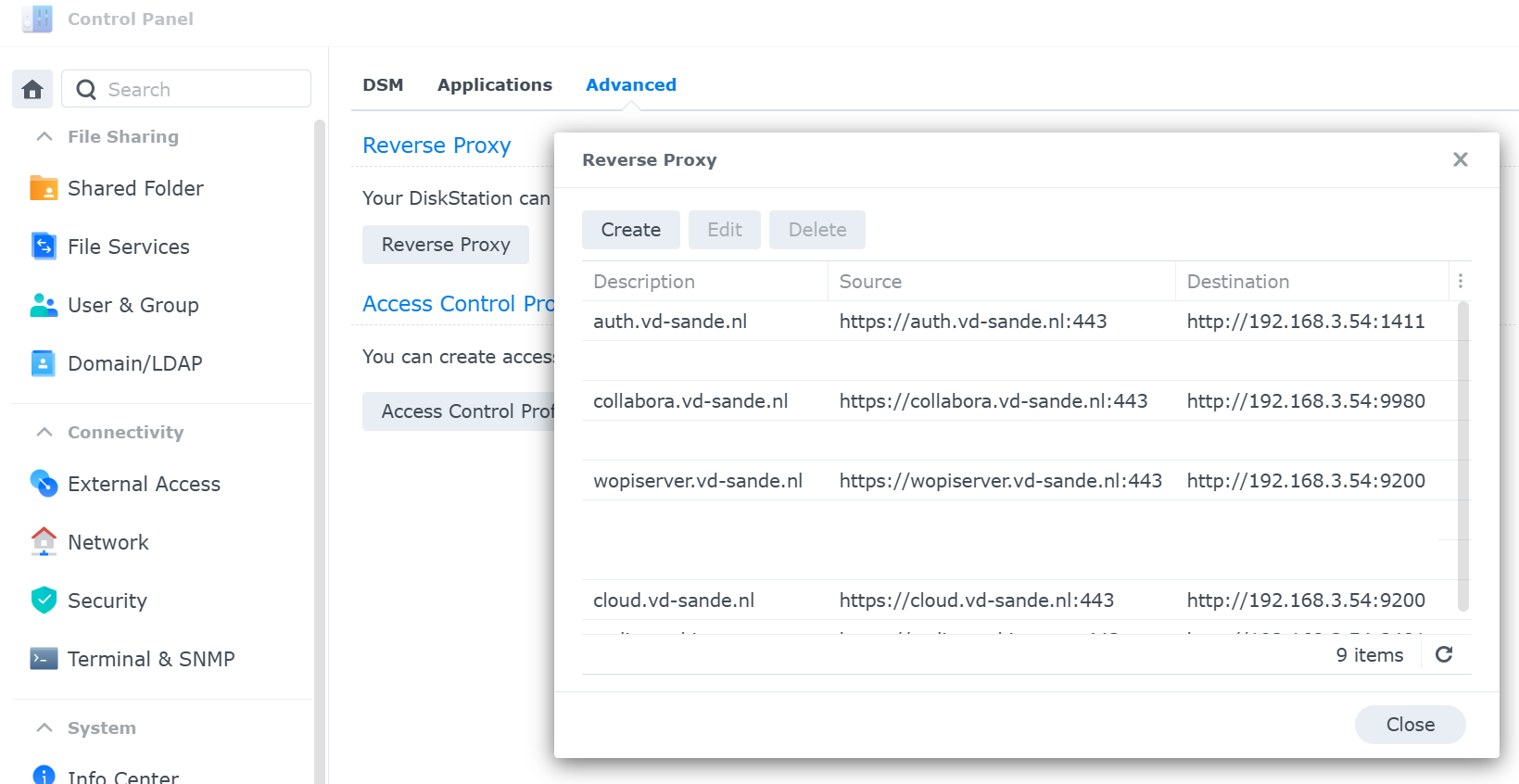
Before running the docker-compose up -d command, ensure that the DNS entries exist and that the reverse proxy is setup and letsencrypt certificates are in place and attached to the reverse proxy.
The reverse proxy rules will look like this:
Separation of Concerns
Thinking in separation of concerns helped me a great deal. Pocket-ID does not need to know anything about OpenCloud, and OpenCloud does not need to manage users itself. The OIDC protocol is the bridge between tem, and it works extremely well.
Keeping the backend hostnames invisible to the end user also makes the setup cleaner. If I ever want to replace Collabora with another editor, I only need to change what sits behind collabora.vd-sande.nl, the user will never notice. The same applies to authentication, storage, or any other component in the stack.
Bye Bye OneDrive?
Self‑hosting is never truly “finished”, but with a clear architecture and well‑defined boundaries, it becomes manageable. And more importantly, it gives me back ownership that the public cloud took away.
- My data,
- my identity,
- my rules,
- and last but not least, my responsibility!
For now I’m extremely happy having my data back in my hands. I moved all my data from OneDrive to OpenCloud. In the background it is backupped on a daily basis. My Android Phone synchronizes data using EasySync, without me having to worry of it. I can share documents like I was used to. From a user perspective, this is exactly what I wanted.
So yeah… Bye Bye! This replaces the OneDrive functionality I was using.
My next challenge, find a mail solution and migrate mailboxes for a complete family. More on that in a next article.