
Sovereignty: Getting control over your Source Control
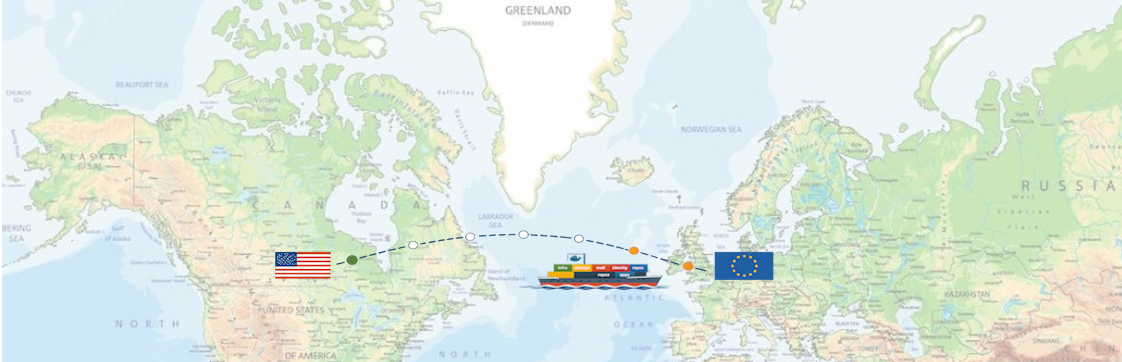
Don’t get me wrong, both GitHub and Azure DevOps are fantastic development platforms. They have only one small problem that doesn’t fit my journey toward digital sovereignty: they fall under United States jurisdiction.
This means that in the end, I don’t have full control over the intellectual property I store there. And at the end of the day I need to be sure that I have access to my source code, no matter what.
Time for a change. Time to bring my sourcecode home. Time to get back in control.
Looking for an alternative
Over the years I’ve worked with many different source control systems. All with certain strengths, all with plenty of quirks. Some of them still exist today, others have long disappeared.
Given my strong GitHub and Azure DevOps background (at Xebia Microsoft Services we live and breathe this stuff), my preference was to find a platform with similar capabilities. The things I was looking for were:
- multiple repositories
- branch support
- public/private access
- GitHub pages-like functionality
- Workflows/pipelines/actions for CICD
- Multifactor/OIDC authentication
- Web-based interface
- Underlying GIT technology
A couple of months ago I was looking into Codeberg, a European alternative to GitHub based on Forgejo. Marc Duiker wrote a great post about getting started with it.
Around the same period I had a discussion with Till Spindler. He mentioned that I should take a look at Gitea, a lightweight open-source GitHub clone.
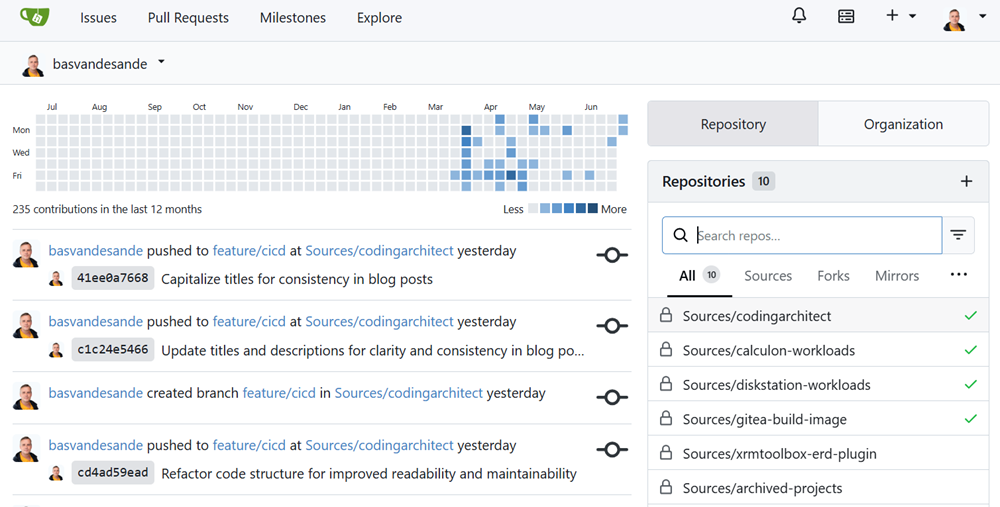
As it turns out, Forgejo is a community-driven spin-off of Gitea. Where Gitea is moving in a more enterprise/commercial direction, Forgejo goes the opposite way. If I were to build my setup today I would choose Forgejo. Gitea is still ahead in terms of functionality, but at the moment I can’t switch because the underlying database version in Gitea it too new for Forgejo.
Anyway Gitea ticked almost all the boxes. The only things missing were GitHub pages-like functionality and a registry to store containers and/or artifacts.
Some research taught me that I could mimic the Pages functionality using Caddy.
For the registry/artifact functionality I decided to use the offical Docker registry image, accompied with a web based UI in the form of Registry-UI.
Anatomy of my supercharged Gitea
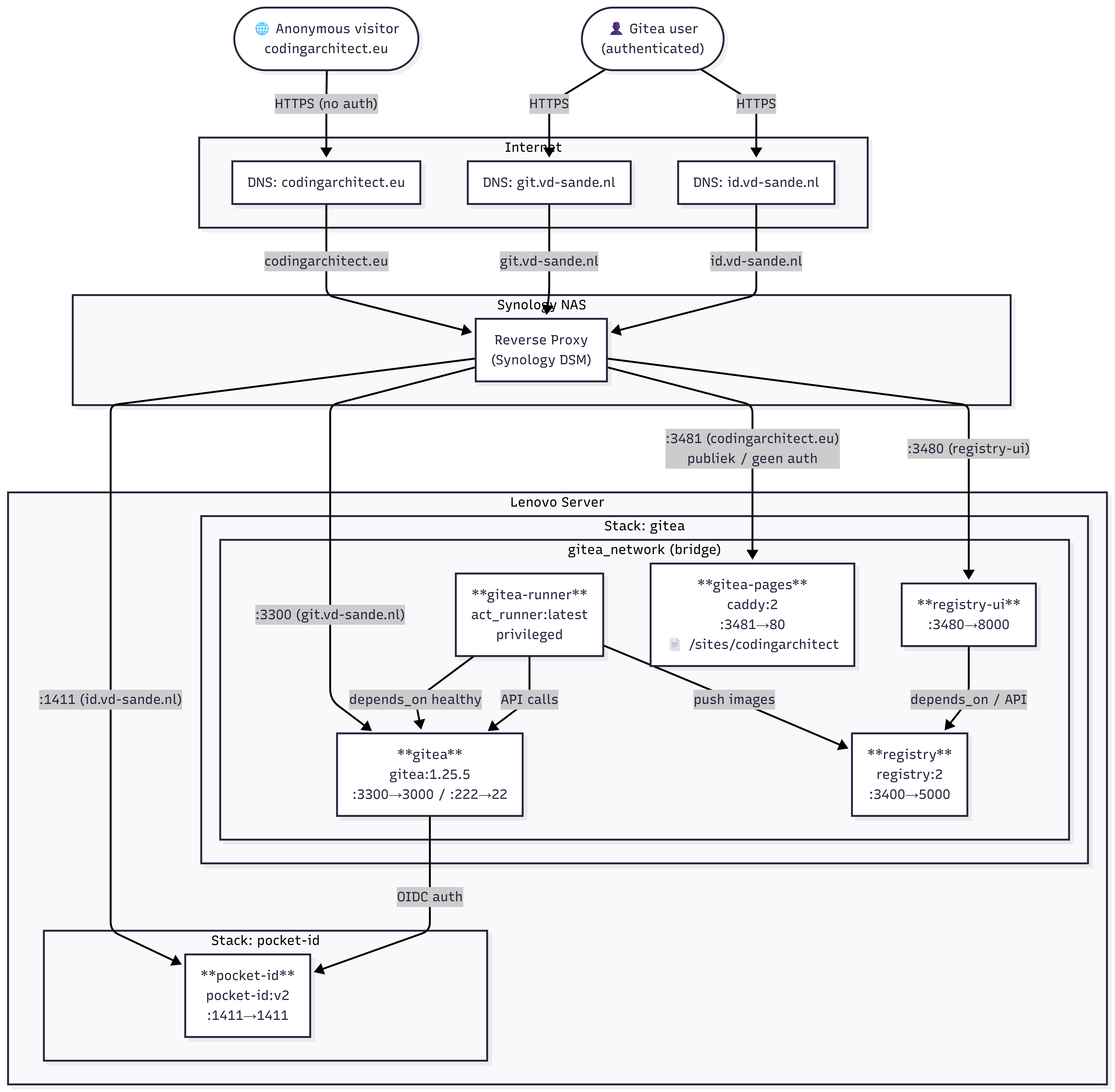
In my setup all traffic enters through the same front door: the internet, DNS, and finally the reverse proxy running on my Synology NAS. That proxy decides where a request should go based on the domain name. This keeps the outside simple, while the inside stays fully modular.
Anonymous visitors land on my public site at codingarchitect.eu, which is served by the Gitea Pages container running Caddy. Authenticated users go to , where Gitea handles everything related to repositories, branches, issues, and worflows. The authentication is handled through Pocket‑ID. Gitea trusts Pocket‑ID as its OIDC identity provider, so login and MFA are handled outside Gitea itself.
On the Lenovo server I run two logical stacks. The first one is the Gitea stack: Gitea itself, the Gitea Runner for CI/CD workflows, the Caddy‑based Pages service, the Docker Registry for storing images and artifacts, and Registry‑UI as a simple web interface on top of that registry. All of these containers communicate over the same internal Docker network, so they can find each other without exposing extra ports.
The second stack is Pocket‑ID, which provides identity and token services. It exposes only one port and stays isolated from the rest, except for the OIDC integration with Gitea.
Everything is connected through HTTPS and routed by the reverse proxy. Gitea talks to Pocket‑ID for authentication, the runner talks to Gitea through its API, Registry‑UI talks to the Docker Registry API, and Caddy serves static content. Internally everything runs on Docker networking; externally everything is behind clean domain names.
In short: a fully self‑hosted Git environment where Gitea, Pocket‑ID, Caddy, and the Docker Registry each do one thing well, and the reverse proxy ties it all together.
Gitea compose
Although I’m a bit Kubernetes fan, I chose to run my personal cloud on Docker (previous article). The Gitea stack is a docker compose, comparable with a k8s deployment.
#
# GITEA
#
networks:
  gitea_network:
    driver: bridge

services:
  gitea:
    image: docker.gitea.com/gitea:1.25.5
    container_name: gitea
    restart: always
    networks:
      - gitea_network

    environment:
      - USER_UID=1027
      - USER_GID=100

    volumes:
      - /mnt/synology/gitea:/data
      - /etc/timezone:/etc/timezone:ro
      - /etc/localtime:/etc/localtime:ro

    ports:
      - "3300:3000"
      - "222:22"

    healthcheck:
      test: ["CMD", "curl", "-f", "http://localhost:3000"]
      interval: 10s
      retries: 3
      start_period: 30s
      timeout: 10s


  runner:
    image: gitea/act_runner:latest
    container_name: gitea-runner
    restart: always
    privileged: true
    user: root

    depends_on:
      gitea:
        condition: service_healthy

    networks:
      - gitea_network

    volumes:
      - ./act_runner/config.yaml:/etc/act_runner/config.yaml:ro
      - ./act_runner:/data
      - /var/run/docker.sock:/var/run/docker.sock
      - ./token.txt:/token.txt:ro

    environment:
      GITEA_INSTANCE_URL: https://git.vd-sande.nl
      GITEA_RUNNER_REGISTRATION_TOKEN_FILE: /token.txt

      # echo -n "username:password" | base64
      DOCKER_AUTH_CONFIG: |
        {
          "auths": {
            "registry.vd-sande.nl": {
              "auth": "[bas64 encrypted username:password]]"
            }
          }
        }

  registry:
    image: registry:2
    restart: always
    networks:
      gitea_network:
        aliases:
          - registry.vd-sande.nl
    ports:
      - "3400:5000"
    user: "1027:100"
    environment:
      - REGISTRY_HTTP_ADDR=:5000
      - REGISTRY_AUTH=htpasswd
      - REGISTRY_AUTH_HTPASSWD_PATH=/auth/htpasswd
      - REGISTRY_AUTH_HTPASSWD_REALM=Registry Realm
    volumes:
      - /var/lib/registry:/var/lib/registry
      - /srv/docker/stacks/apps/gitea/registry:/auth:ro

  registry-ui:
    image: chickenbellyfin/registry-ui:latest
    container_name: registry-ui
    restart: unless-stopped
    networks:
      - gitea_network
    ports:
      - "3480:8000"
    environment:
      - REGISTRY_URL=http://registry:5000
      - REGISTRY_USERNAME=${REGISTRY_USERNAME}
      - REGISTRY_PASSWORD=${REGISTRY_PASSWORD}
      - REGISTRY_BASIC_AUTH=true
    depends_on:
      - registry

  # use caddy for speedy pages static page host functonality
  gitea-pages:
    image: caddy:2
    container_name: gitea-pages
    restart: unless-stopped
    user: "1027:100"
    expose:
      - "80"
    ports:
      - "3481:80"
    volumes:
      - ./pages/sites/codingarchitect:/sites/codingarchitect:ro
      - ./pages/Caddyfile:/etc/caddy/Caddyfile:ro
    networks:
      - gitea_network
The runner image
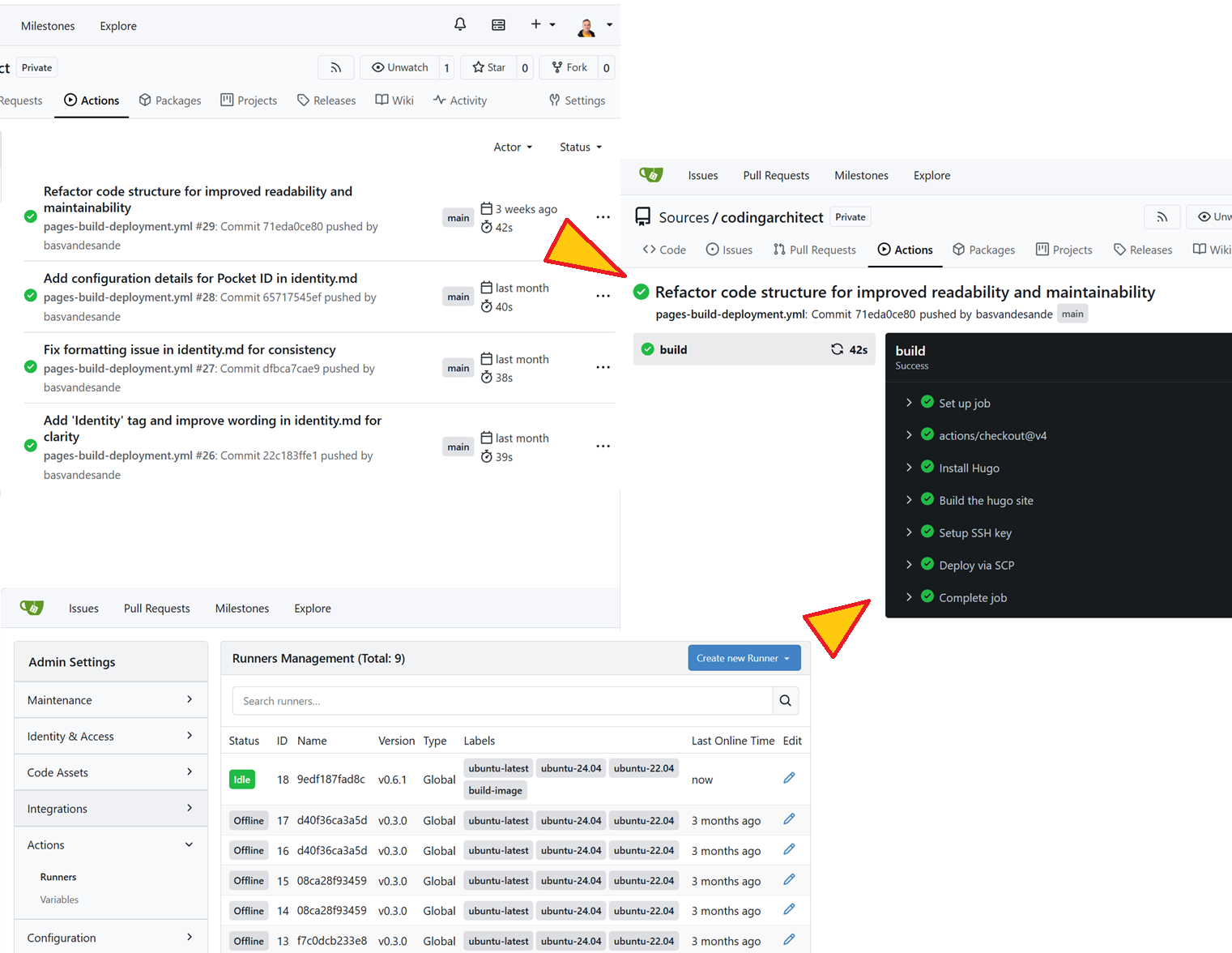
The cool thing about Gitea is that is has a GitHub actions compatible ARC Runner, allowing you to set up a solid CICD framework using custom runner images. The runner image I created is based on Debian Trixie, containing dotNet 10, Go, Terraform, KubeCtl, Helm etc., allowing me to run any kind of workflow that I want.
dockerfile
# -----------------------------------------
# Stage 1 - Download tools
# -----------------------------------------
FROM debian:trixie-slim AS downloader

ARG DOTNET_VERSION=10.0.201
ARG GO_VERSION=1.26.1
ARG TERRAFORM_VERSION=1.13.3
ARG KUBECTL_VERSION=1.35.2
ARG HELM_VERSION=3.16.0

RUN apt-get update && apt-get install -y --no-install-recommends \
    ca-certificates curl wget gnupg unzip tar xz-utils upx-ucl && \
    rm -rf /var/lib/apt/lists/*

# .NET SDK (tar.gz)
RUN mkdir -p /usr/share/dotnet \
    && wget https://dot.net/v1/dotnet-install.sh -O /tmp/dotnet-install.sh \
    && chmod +x /tmp/dotnet-install.sh \
    && /tmp/dotnet-install.sh --version ${DOTNET_VERSION} --install-dir /usr/share/dotnet \
    && rm /tmp/dotnet-install.sh

ENV DOTNET_ROOT=/usr/share/dotnet
ENV PATH="${PATH}:/usr/share/dotnet"

# Go
RUN wget https://go.dev/dl/go${GO_VERSION}.linux-amd64.tar.gz && \
    tar -C /tmp -xzf go${GO_VERSION}.linux-amd64.tar.gz && \
    mv /tmp/go /go && rm go${GO_VERSION}.linux-amd64.tar.gz

# Terraform
RUN wget https://releases.hashicorp.com/terraform/${TERRAFORM_VERSION}/terraform_${TERRAFORM_VERSION}_linux_amd64.zip && \
    unzip terraform_${TERRAFORM_VERSION}_linux_amd64.zip -d /tmp && \
    mv /tmp/terraform /terraform && rm terraform_${TERRAFORM_VERSION}_linux_amd64.zip

# kubectl
RUN curl -LO https://dl.k8s.io/release/v${KUBECTL_VERSION}/bin/linux/amd64/kubectl \
    && chmod +x kubectl \
    && mv kubectl /usr/local/bin/kubectl


# Helm
RUN wget https://get.helm.sh/helm-v${HELM_VERSION}-linux-amd64.tar.gz && \
    tar -zxf helm-v${HELM_VERSION}-linux-amd64.tar.gz && \
    mv linux-amd64/helm /helm && rm -rf linux-amd64 helm-v${HELM_VERSION}-linux-amd64.tar.gz

# -----------------------------------------
# Stage 2 - Compress binaries using UPX
# -----------------------------------------
FROM debian:trixie-slim AS compressor
RUN apt-get update && apt-get install -y --no-install-recommends upx-ucl && rm -rf /var/lib/apt/lists/*

COPY --from=downloader /go /go
COPY --from=downloader /terraform /terraform
COPY --from=downloader /usr/local/bin/kubectl /kubectl
COPY --from=downloader /helm /helm

RUN upx --best --lzma /go/bin/go || true
RUN upx --best --lzma /terraform || true
RUN upx --best --lzma /kubectl || true
RUN upx --best --lzma /helm || true

# -----------------------------------------
# Stage 3 - Final ultralight image
# -----------------------------------------
FROM debian:trixie-slim

# Systeem libs (minimale voor cloud tooling + Azure CLI)
RUN apt-get update && apt-get install -y --no-install-recommends \
    ca-certificates curl gnupg lsb-release libc6 libssl3 zlib1g \
    python3 python3-venv python3-pip \
    openssh-client && \
    rm -rf /var/lib/apt/lists/*

# Node.js 20 toevoegen (nodig voor actions/checkout@v4)
RUN curl -fsSL https://deb.nodesource.com/setup_20.x | bash - \
    && apt-get update \
    && apt-get install -y --no-install-recommends nodejs \
    && rm -rf /var/lib/apt/lists/*

# Docker CLI installeren (officiële Docker repo)
RUN apt-get update && apt-get install -y --no-install-recommends \
    ca-certificates curl gnupg && \
    install -m 0755 -d /etc/apt/keyrings && \
    curl -fsSL https://download.docker.com/linux/debian/gpg | gpg --dearmor -o /etc/apt/keyrings/docker.gpg && \
    chmod a+r /etc/apt/keyrings/docker.gpg && \
    echo \
      "deb [arch=$(dpkg --print-architecture) signed-by=/etc/apt/keyrings/docker.gpg] https://download.docker.com/linux/debian \
      $(. /etc/os-release && echo $VERSION_CODENAME) stable" | \
      tee /etc/apt/sources.list.d/docker.list > /dev/null && \
    apt-get update && \
    apt-get install -y --no-install-recommends docker-ce-cli && \
    rm -rf /var/lib/apt/lists/*

# Install sshpass and jq
RUN apt-get update && apt-get install -y jq sshpass


# Azure CLI via install script (Microsoft recommended for unsupported distros)
RUN curl -sL https://aka.ms/InstallAzureCLIDeb | bash

# .NET 10 SDK binaries
COPY --from=downloader /usr/share/dotnet /usr/share/dotnet
ENV DOTNET_ROOT=/usr/share/dotnet
ENV PATH="${PATH}:/usr/share/dotnet"

# Go, Terraform, kubectl, Helm (gecomprimeerd)
COPY --from=compressor /go /usr/local/go
COPY --from=compressor /terraform /usr/local/bin/terraform
COPY --from=compressor /kubectl /usr/local/bin/kubectl
COPY --from=compressor /helm /usr/local/bin/helm

ENV PATH="${PATH}:/usr/local/go/bin"

# Strip debug symbols
RUN find /usr/share/dotnet -type f -exec strip --strip-unneeded {} \; || true

CMD ["bash"]
Wrap up
With all components wired together — Gitea, Pocket‑ID, Caddy, the Docker Registry, and the Synology reverse proxy — my source control stack now runs as a fully self‑hosted system. Every request, every workflow, every image push follows a path I designed myself. No external dependencies, no opaque services, no third‑party policies, no US jurisdiction.
Just a clean, predictable chain of containers, networks, and protocols that I control end‑to‑end.
For me, this is what digital sovereignty looks like in practice: my code, my identity, my workflows, all running on my own infrastructure, exactly the way I want it.