
Backups: The Illusion of Safety
Something was very, very wrong.
Every day, for weeks, the same two emails landed in my inbox: Backup failed. Data corrupted. At first, I ignored them. Big mistake.
A corrupted backup is, in many ways, worse than having no backup at all. You think you’re protected—until the moment you actually need it. That’s when false confidence turns into real risk.
Time to get this sorted out, once and for all.
Some background
To understand why this happened, let’s rewind a bit.
I’m moving away from American BigTech, as a result I’m building my own digital sovereignty.
Every choice is well made, with long-term robustness and control in mind. The days when Linux and self-hosting were only for über-geeks? Those are long gone. Today, these tools are mature, powerful and accessible, if you’re willing to learn.
In my setup, a Lenovo server handles the heavy lifting, while a Synology NAS manages storage, routing, and certificates. The NAS hosts a RAID 1 pool, where two disks mirror each other. If one fails, the other keeps my data safe.
To add another layer of resilience, I set up off-site backups for the most critical shares. Instead of building a second NAS, I opted for S3-compatible object storage at OVH Cloud. That way, if disaster strikes (like fire, theft, etc.) my data would still be safe.
At least… that was the plan.
The root of all evil
The off-site backups were handled by Synology Hyper Backup. On paper, it was the obvious choice: built into DSM, easy to configure, and packed with features like encryption and versioning.
That didn’t work out as expected. It turns out that Hyper Backup doesn’t store files as-is. It chops them up, compresses them, and wraps them in its own proprietary format. Efficient? I guess. Transparent? Not at all.
At some point Hyper Backup reported corruption, it wasn’t just a single file. It turned out that the entire backup’s internal structure was broken; missing objects, broken indexes, or mismatched metadata. And the worst part? The local data was fine. Only the remote backup was corrupted.

Enter Borg (and Borgmatic)
So, what should a paranoid sysadmin do? If I couldn’t trust the black box, I’d build my own.
For me, the answer was simple: ownership, transparency, and trust. That’s what led me to Borg Backup, with Borgmatic on top. There are plenty of other alternatives, such as Restic.
Borg does everything Hyper Backup does: deduplication, compression, encryption. However there is one critical difference, Borg uses an open format (well documented) with built-in integrity checks.
But choosing Borg was only the first step. Making backups boring, automated, and trustworthy? That was the real challenge.
ContainerManager to the rescue
On my Synology, I decided to take control—no more black boxes. I installed two Docker containers: one for Borg Backup and one for Rclone. The idea is simple:
- Borg handles the heavy lifting: creating a local, deduplicated, encrypted, and verifiable backup repository on the NAS.
- Rclone then syncs that repository to OVH’s S3-compatible storage, off-site and out of harm’s way.
version: "3.8"

services:
  borgmatic:
    image: ghcr.io/borgmatic-collective/borgmatic:latest
    container_name: borgmatic
    restart: unless-stopped

    volumes:
      - /volume1/docker/borgmatic/config:/etc/borgmatic
      - /volume1/docker/borgmatic/cache:/root/.cache/borg
      - /volume1/docker/borgmatic/data:/data
      - /volume1/docker/borgmatic/tmp:/tmp
      - /volume1:/source:ro
      - /etc/localtime:/etc/localtime:ro
      - /volume1/docker/borgmatic/config/borg_passphrase.txt:/etc/borg_passphrase.txt:ro

    environment:
      - TZ=Europe/Amsterdam
      - BORG_PASSCOMMAND=cat /etc/borg_passphrase.txt

    command: tail -f /dev/null

  rclone:
    image: rclone/rclone:latest
    container_name: rclone
    restart: unless-stopped

    volumes:
      - /volume1/docker/borgmatic/rclone:/config/rclone
      - /volume1/docker/borgmatic/data:/data

    entrypoint: ["tail", "-f", "/dev/null"]
On the Synology I created a passphrase file in /volume1/docker/borgmatic/config/ borg_passphrase.txt. The passphrase is used to encrypt the repositories created by Borg. Encrypting the repositories make it more efficient to store.
To backup my data I wrote a bash script. The script creates a repository if it does not exist (and saves the password). When the reposity exists, the script calls the borgmatic tool to store the latest changes in the repository (in case of an initial backup, it is the entire folder specified).
Per repository, Borgmatic uses a configuration file that describes what should be backupped, what data retention should be applied etc.
source_directories:
  - /source/photo

exclude_from:
  - /etc/borgmatic/excludes/common.txt

repositories:
  - path: /data/repos/photos
    label: photos

keep_daily: 7
keep_weekly: 4
keep_monthly: 6

checks:
  - name: repository
  - name: archives
The next command in the script uploads the repo to the s3 storage, using the rclone utility. the rclone utility uses a config file in which the connection information is stored. See example below.
[s3]
type = s3
provider = Other
env_auth = false
access_key_id = __S3_ACCESS_KEY__
secret_access_key = __S3_SECRET_KEY__
endpoint = __S3_ENDPOINT__
The backup script…
#!/bin/bash
set -e

if [ -z "$1" ]; then
  echo "Usage: ./backup.sh <repo-name> [repo-name2] ..."
  echo ""
  echo "Initializes the Borg repository if it doesn't exist, runs a borgmatic backup,"
  echo "and creates the passkey files for later usage (restoring data)."
  echo ""
  echo "Example: ./backup.sh photos docs media"
  exit 1
fi

for REPO_NAME in "$@"; do

CONFIG="/etc/borgmatic/configs/${REPO_NAME}.yaml"
REPO_PATH="/data/repos/${REPO_NAME}"
S3_TARGET="s3:s3-synology/${REPO_NAME}"

echo "=== Backup: $REPO_NAME ==="

echo "Init repo if needed"


docker exec borgmatic bash -c '
REPO="/data/repos/'"$REPO_NAME"'"
KEY_BASE="/etc/borgmatic/'"$REPO_NAME"'-key"

if ! borg info $REPO > /dev/null 2>&1; then
  echo "→ Initializing repo: $REPO"

  borg init --encryption=repokey $REPO

  echo "→ Exporting keys"

  borg key export $REPO ${KEY_BASE}
  borg key export --paper $REPO ${KEY_BASE}.txt
  borg key export --qr-html $REPO ${KEY_BASE}.html

  echo "✅ Repo initialized + keys exported"
else
  echo "→ Repo already exists, skipping init"
fi
'

echo "Run backup"
docker exec borgmatic borgmatic -c ${CONFIG}

echo "Sync to S3"
docker exec rclone rclone sync ${REPO_PATH} ${S3_TARGET} \
  --fast-list \
  --transfers 2 \
  --checkers 2 \
  --s3-chunk-size 16M

echo "✅ Done: $REPO_NAME"
done
I’m not paranoid!
The Hyper Backup debacle made me weary, no matter what I need to be able to verify if the backup data still is valid. Therefor I wrote a small check.sh script in which I could check if the backup repositories are still in a healthy condition.
#!/bin/bash
set -e

if [ -z "$1" ]; then
  echo "Usage: ./check.sh <repo-name> [repo-name2] ..."
  echo ""
  echo "Verifies the integrity of the Borg repository and its archives."
  echo "Checks both the repository structure and archive consistency."
  echo ""
  echo "Example: ./check.sh photos docs media"
  exit 1
fi

for REPO_NAME in "$@"; do

CONFIG="/etc/borgmatic/configs/${REPO_NAME}.yaml"

echo "=== Check: $REPO_NAME ==="
docker exec borgmatic borgmatic check -c ${CONFIG}
echo "✅ Check done: $REPO_NAME"
done
Controlling the costs
And last but not least, I want have a lifecycle of the backupped data. After a certain interval, the data needs to be flushed from the backup. Otherwise storage costs might go through the roof. For this I wrote a small prune.sh script.
#!/bin/bash
set -e

if [ -z "$1" ]; then
  echo "Usage: ./prune.sh <repo-name> [repo-name2] ..."
  echo ""
  echo "Removes old Borg archives from the repository according to the retention"
  echo "policy defined in the borgmatic config (keep_daily, keep_weekly, keep_monthly)."
  echo ""
  echo "Example: ./prune.sh photos docs media"
  exit 1
fi

for REPO_NAME in "$@"; do

CONFIG="/etc/borgmatic/configs/${REPO_NAME}.yaml"

echo "=== Prune: $REPO_NAME ==="
docker exec borgmatic borgmatic prune -c ${CONFIG}
echo "✅ Prune done: $REPO_NAME"
done
Fire and forget
The last step was scheduling all these tasks in the Synology scheduler. Making sure that the data is stored, verified and pruned at my conditions.
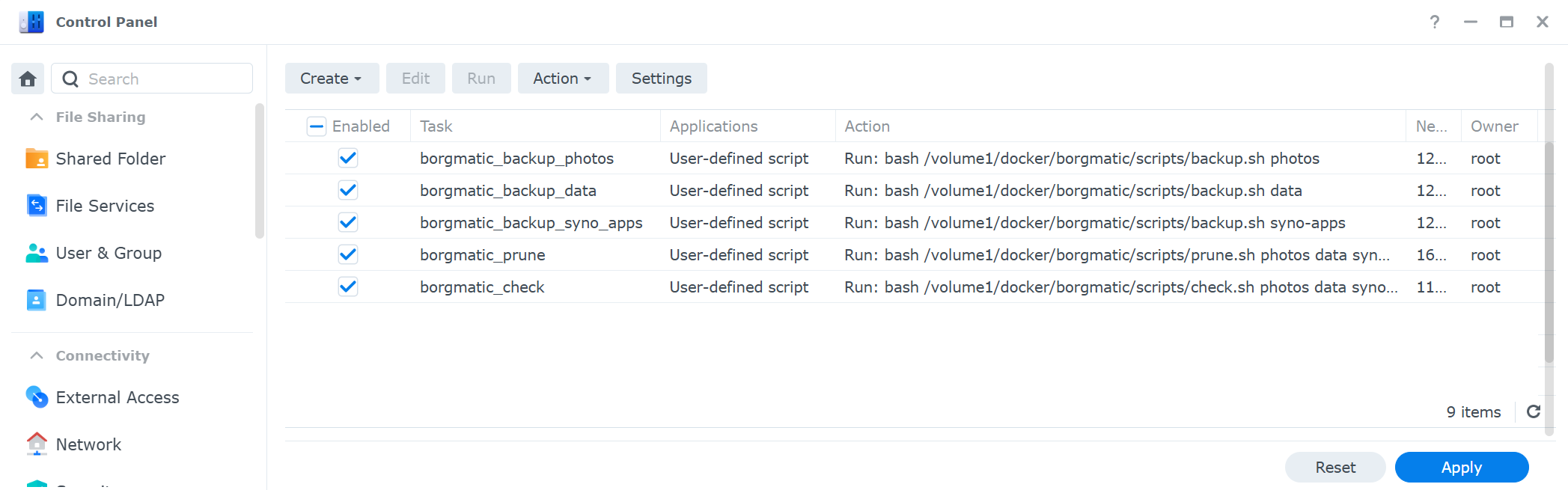
I think, I turned my backup into something boring.. I’ve been running the new backup solution for a couple of weeks. In case a job fails, the Synology Scheduler is configured to send me a mail.
Until now, my mailbox remained clean.